

Tip
Need help? Please let us know in the SUEWS Community.
Please report issues with the manual on GitHub Issues (or use Report Issue for This Page for page-specific feedback).
Please cite SUEWS with proper information from our Zenodo page.
Note
Go to the end to download the full example code.
3.2. Set Up SUEWS for Your Own Site#
Configure SUEWS parameters for a custom research location.
This tutorial demonstrates how to configure SUEWS for your own site using external forcing data. We use the US-AR1 site (ARM Southern Great Plains, Oklahoma, USA) as an example - a grassland flux tower site with high-quality observations.
You will learn to:
Configure site-specific settings (location, land cover, vegetation)
Load external forcing data from a file
Run the simulation and analyse results
API approach: This tutorial uses the SUEWSSimulation OOP interface
with update_config() for parameter modification. This approach provides
a clean separation between configuration and execution.
from pathlib import Path

import matplotlib.pyplot as plt

from supy import SUEWSSimulation
3.2.1. Create Simulation from Sample Data#
We start with built-in sample data to get valid default parameters,
then modify them for our target site using update_config().
sim = SUEWSSimulation.from_sample_data()

print("Sample data loaded successfully!")
print(f"Default grid ID: {sim.state_init.index[0]}")
Sample data loaded successfully!
Default grid ID: 1
3.2.2. Configure Site Location#
Set the geographic coordinates and altitude for the US-AR1 site. These affect solar geometry calculations and atmospheric corrections.
# US-AR1: ARM Southern Great Plains, Oklahoma, USA
sim.update_config({
    "sites": {0: {
        "properties": {
            "lat": 36.6,      # Latitude (degrees)
            "lng": -97.5,     # Longitude (degrees)
            "alt": 314.0,     # Altitude (metres)
            "timezone": -6,   # Central Time (UTC-6)
        }
    }}
})

print("Site: US-AR1 (ARM Southern Great Plains)")
print("Location: lat=36.6, lng=-97.5")
Site: US-AR1 (ARM Southern Great Plains)
Location: lat=36.6, lng=-97.5
3.2.3. Configure Land Cover Fractions#
SUEWS divides the urban surface into 7 land cover types:
0: Paved surfaces
1: Buildings
2: Evergreen trees
3: Deciduous trees
4: Grass
5: Bare soil
6: Water
Fractions must sum to 1.0. For this grassland site, we set 100% grass.
sim.update_config({
    "sites": {0: {
        "initial_states": {
            "sfr_surf": [0, 0, 0, 0, 1.0, 0, 0],  # 100% grass (index 4)
        }
    }}
})

print("Surface fractions configured: 100% grass")
Surface fractions configured: 100% grass
3.2.4. Configure Vegetation Parameters#
Vegetation parameters control albedo, LAI, and phenology. These determine how the surface interacts with solar radiation and atmospheric conditions throughout the growing season.
sim.update_config({
    "sites": {0: {
        "properties": {
            # Measurement height (metres) - affects aerodynamic calculations
            "z": 40.0,
            # Disable anthropogenic heat (rural site)
            "popdensdaytime": 0,
            "popdensnighttime": 0,
        }
    }}
})

print("Site properties configured")
Site properties configured
3.2.5. Load External Forcing Data#
Load meteorological observations from the US-AR1 site. The forcing file contains hourly observations for 2010.
Note
update_forcing() automatically resamples the forcing data to match
the model timestep (model.control.tstep, default 300s = 5 minutes).
Hourly forcing data is interpolated to the finer model resolution.
# Determine script directory (works both standalone and in sphinx-gallery).
# sphinx-gallery does not define __file__ in its execution context, so
# we fall back to cwd (which sphinx-gallery sets to the script's source dir).
# This pattern is repeated across tutorials that load local data files.
try:
    _script_dir = Path(__file__).resolve().parent
except NameError:
    _script_dir = Path.cwd()

# Path to forcing data
path_forcing = _script_dir / "data" / "US-AR1_2010_data_60.txt"

# Load forcing from file. Automatically resampled to match model.control.tstep (300s).
sim.update_forcing(path_forcing)

# Slice to the analysis period. This is a separate call because
# update_forcing() first loads the full file, then we select the time window.
sim.update_forcing(sim.forcing["2010-01":"2010-03"])
SUEWSSimulation(Ready: 1 site(s), 25919 timesteps)
Note
When you need to modify forcing data (e.g., data cleaning, adding
variables), extract the DataFrame with .df, make changes, then
pass it back to update_forcing(). For read-only access (slicing,
resampling, column selection), use the OOP methods directly.
# Clean forcing data: clip small negative kdown values to 0
# (common measurement noise from pyranometers at night)
df_forcing_cleaned = sim.forcing.df  # .df returns a copy
df_forcing_cleaned["kdown"] = df_forcing_cleaned["kdown"].clip(lower=0)
sim.update_forcing(df_forcing_cleaned)

print(f"Forcing period: {sim.forcing.time_range[0]} to {sim.forcing.time_range[1]}")
print(f"Time steps: {len(sim.forcing)}")
Forcing period: 2010-01-01 00:05:00 to 2010-03-31 23:55:00
Time steps: 25919
3.2.6. Visualise Forcing Data#
Examine the key meteorological variables that drive the simulation.
list_var = ["kdown", "Tair", "RH", "U", "rain"]
dict_labels = {
    "kdown": r"$K_\downarrow$ (W m$^{-2}$)",
    "Tair": r"$T_{air}$ ($^\circ$C)",
    "RH": "RH (%)",
    "U": r"$U$ (m s$^{-1}$)",
    "rain": "Rain (mm)",
}

# Resample to hourly for clearer plots (handles rain as sum automatically)
df_plot = sim.forcing.resample("1h")[list_var]

fig, axes = plt.subplots(5, 1, figsize=(10, 10), sharex=True)
for ax, var in zip(axes, list_var):
    df_plot[var].plot(ax=ax)
    ax.set_ylabel(dict_labels[var])
axes[-1].set_xlabel("Date")
fig.suptitle("Forcing Data Overview", fontsize=12, y=1.02)
plt.tight_layout()

3.2.7. Run Simulation#
Run the simulation with the configured site and forcing data. We must update the control times to match our 2010 forcing period (the sample data defaults to 2011-2013).
sim.update_config({
    "model": {
        "control": {
            "start_time": "2010-01-01",
            "end_time": "2010-03-31",
        }
    }
})

output = sim.run(logging_level=90)

print(f"Simulation complete: {len(output.times)} timesteps")
Simulation complete: 25919 timesteps
3.2.8. Analyse Energy Balance#
Examine the simulated surface energy balance components.
df_suews = output.SUEWS
grid = output.grids[0]
df_results = df_suews.loc[grid]

# Daily means
df_daily = df_results.resample("1D").mean()

dict_var_disp = {
    "QN": r"$Q^*$",
    "QS": r"$\Delta Q_S$",
    "QE": "$Q_E$",
    "QH": "$Q_H$",
}

fig, ax = plt.subplots(figsize=(10, 4))
df_daily[["QN", "QS", "QE", "QH"]].rename(columns=dict_var_disp).plot(ax=ax)
ax.set_xlabel("Date")
ax.set_ylabel(r"Flux (W m$^{-2}$)")
ax.set_title("Daily Mean Surface Energy Balance")
ax.legend()
plt.tight_layout()

3.2.9. Examine LAI Dynamics#
Check how LAI evolves through the simulation based on temperature accumulation.
df_daily_state = output.DailyState.loc[grid].dropna(how="all").resample("1D").mean()

if "LAI_Grass" in df_daily_state.columns and not df_daily_state["LAI_Grass"].dropna().empty:
    fig, ax = plt.subplots(figsize=(10, 3))
    df_daily_state["LAI_Grass"].plot(ax=ax)
    ax.set_xlabel("Date")
    ax.set_ylabel("LAI (m$^2$ m$^{-2}$)")
    ax.set_title("Grass LAI Evolution")
    plt.tight_layout()
else:
    print("LAI_Grass not available or empty in DailyState output")

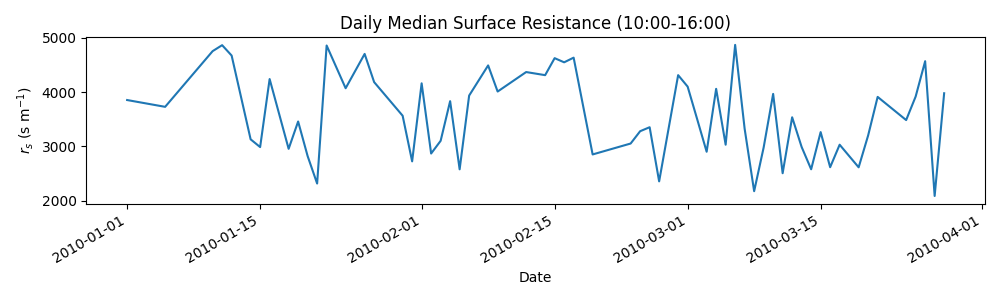
3.2.10. Surface Resistance Analysis#
Examine how surface resistance varies with environmental conditions.
ser_rs = df_results["RS"]

# Daily median resistance (filter extreme values)
df_rs_daily = ser_rs.between_time("10:00", "16:00").resample("1D").median()
df_rs_daily = df_rs_daily[df_rs_daily < 5000]  # Filter outliers (high in winter)

if not df_rs_daily.dropna().empty:
    fig, ax = plt.subplots(figsize=(10, 3))
    df_rs_daily.plot(ax=ax)
    ax.set_xlabel("Date")
    ax.set_ylabel(r"$r_s$ (s m$^{-1}$)")
    ax.set_title("Daily Median Surface Resistance (10:00-16:00)")
    plt.tight_layout()
else:
    print("No valid surface resistance data for this period")
3.2.11. Summary#
This tutorial demonstrated how to configure SUEWS for a custom site using the OOP API:
Create simulation:
from_sample_data()for defaultsConfigure site:
update_config()with nested dictionary structureLoad forcing:
update_forcing()with automatic resamplingRun simulation:
run()returnsSUEWSOutputobject
Key concepts:
update_config()accepts nested dicts:{"sites": {0: {"properties": {...}}}}Forcing data is automatically resampled to match
model.control.tstepData cleaning requires extracting
.df, modifying, then passing back
Next steps:
tutorial_03_impact_studies - Sensitivity analysis and scenario modelling
Total running time of the script: (0 minutes 30.814 seconds)